.png)


What Is a Restaurant POS System? Everything You Need to Know
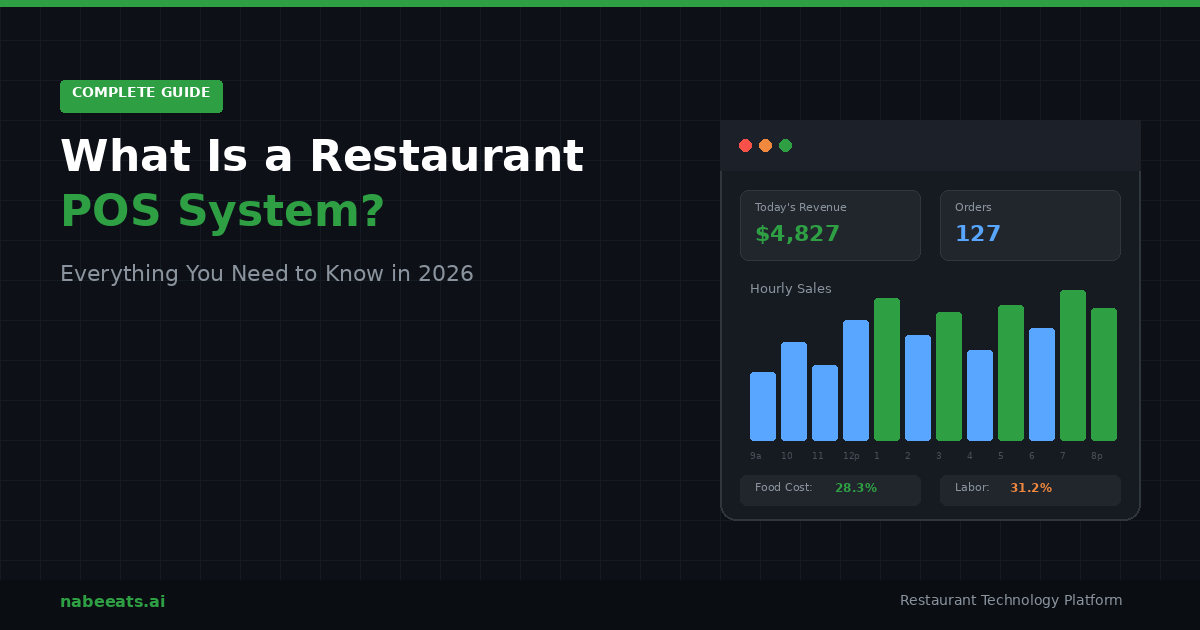
A restaurant POS system, short for point of sale, is the hardware and software a restaurant uses to take orders, process payments, track inventory, manage staff, and analyze sales data in real time. Modern POS systems go far beyond the old cash register: they connect online ordering, delivery apps, loyalty programs, and customer data into a single platform that runs your entire operation.
If you have ever wondered what a POS system actually does in a restaurant, or why every restaurant tech conversation starts here, this guide breaks it down without the jargon.
Why Your POS System Is Probably the Most Important Tech Decision You Will Make
Here is the thing most restaurant owners do not realize until they are knee-deep in operations: your POS is not just where payments happen. It is the nervous system of your business.
Every single order, whether someone walks in, calls for takeout, orders from your website, or taps through DoorDash, flows through your POS. That means it touches your revenue, your kitchen speed, your food costs, your labor scheduling, and your ability to understand what is actually working.
Pick the wrong one and you are stuck with clunky workarounds, duplicate menus, and reporting that tells you nothing useful. Pick the right one and you have got a single source of truth for everything.
That is not an exaggeration. According to industry benchmarks, food costs typically eat up 25 to 35 percent of restaurant revenue, and labor takes another 30 to 35 percent. A POS system that gives you real-time visibility into both? That is not a nice-to-have. That is how you protect your margins.
How Does a Restaurant POS System Actually Work?
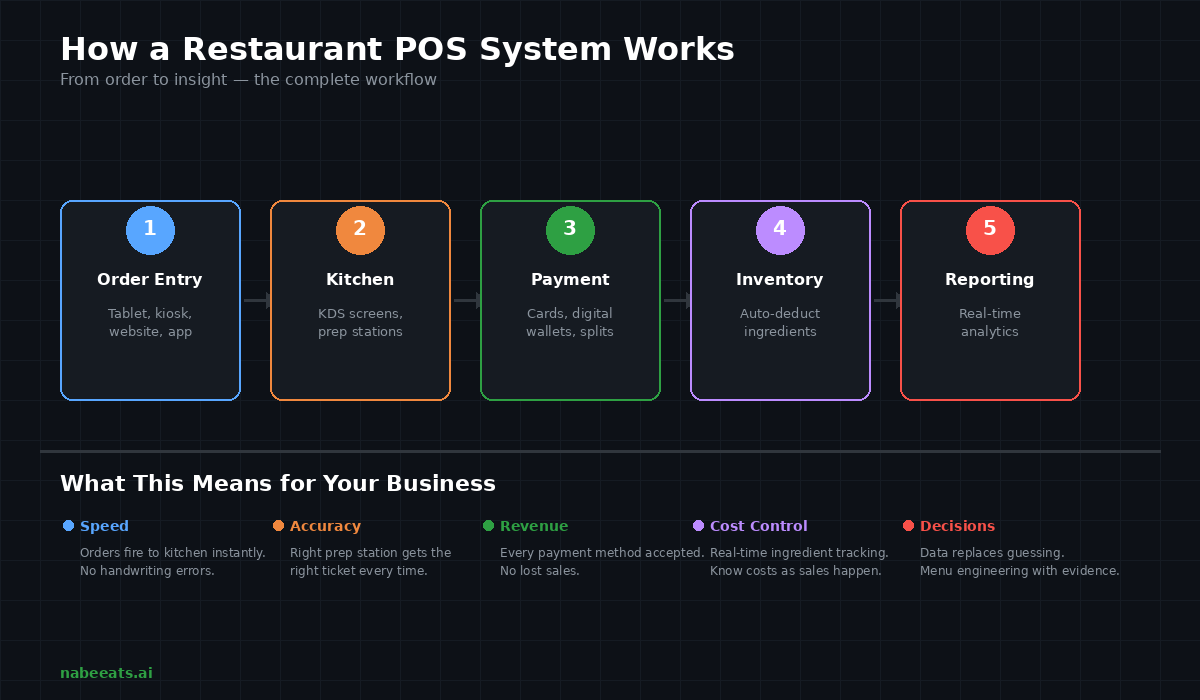
Let us walk through what happens from the moment a customer places an order to the moment you review your nightly numbers.
Order Entry
Orders come in from everywhere now. A server punches it in on a tablet. A customer taps on a self-order kiosk. Someone orders through your website or a delivery app. The POS catches all of it, applies the right modifiers, calculates taxes and discounts, and fires the ticket to the kitchen instantly.
No handwriting. No miscommunication. No "I thought they said no onions."
Kitchen Communication
The order shows up on a kitchen display system (KDS) or prints at the right prep station. The grill cook sees the burgers. The bar sees the drinks. Everyone is working off the same information at the same time.
This is where restaurants shave minutes off ticket times, and minutes matter when you are doing 200 covers on a Friday night.
Payment Processing
Credit cards, debit, Apple Pay, Google Pay, gift cards, split checks: your POS handles all of it. Most modern systems have integrated payment processing built in, typically running 2.6 percent to 3.5 percent per transaction.
The days of separate payment terminals that do not talk to your order system are (thankfully) mostly over.
Inventory Updates in Real Time
This is where it gets powerful. Every time you sell a burger, the POS automatically deducts a bun, a patty, cheese, lettuce, whatever is in the recipe. You are not counting stock by hand at midnight. The system does it as sales happen.
When your cheese is running low, you know before the dinner rush, not during it.
Reporting That Actually Helps You Make Decisions
At the end of the day (or in real time, if you want), you can see which menu items are making you money and which ones are dead weight, what your busiest hours look like, how your labor costs compare to sales, and what your average check size is by channel: dine-in vs. takeout vs. delivery.
Instead of guessing, you are operating on data. And that changes everything about how you run your restaurant.
Types of Restaurant POS Systems (And Which One Fits You)
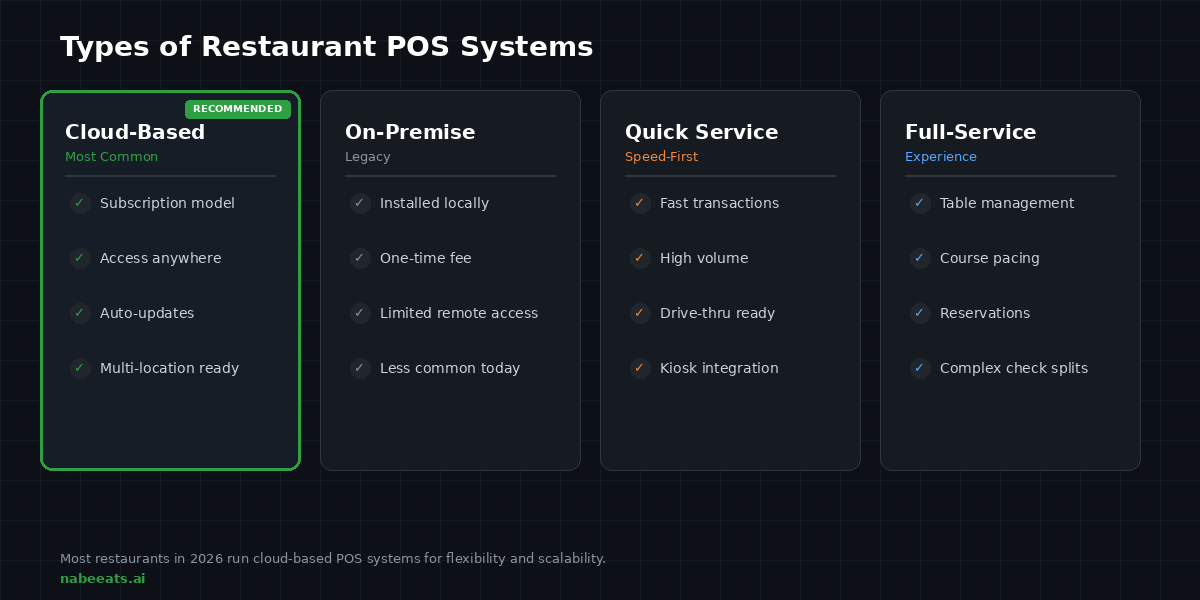
Not all POS systems work the same way. The right choice depends on your restaurant model.
Cloud-Based POS Systems
This is where the market has landed. Cloud-based systems run on a subscription model, update automatically, and let you check your numbers from your phone at home. They scale easily if you open a second location or launch catering.
Most of the modern players like Toast, Square, and Clover are cloud-based. It is the standard now for good reason.
On-Premise POS Systems
These are installed locally on your own servers. You pay a one-time license fee instead of monthly subscriptions. The trade-off? Limited remote access, slower updates, and more IT headaches. They are becoming less common, but some legacy restaurants still run on them.
Quick Service (QSR) POS
Built for speed. If you are running a counter-service spot, a drive-thru, or a high-volume kiosk operation, QSR systems prioritize fast transactions and simple workflows. Think Chick-fil-A efficiency.
Full-Service POS
Designed for sit-down restaurants where table management, course pacing, reservations, and complex check splitting matter. If you are running a 150-seat restaurant with a bar program, this is your lane.
The Features That Actually Matter in 2026
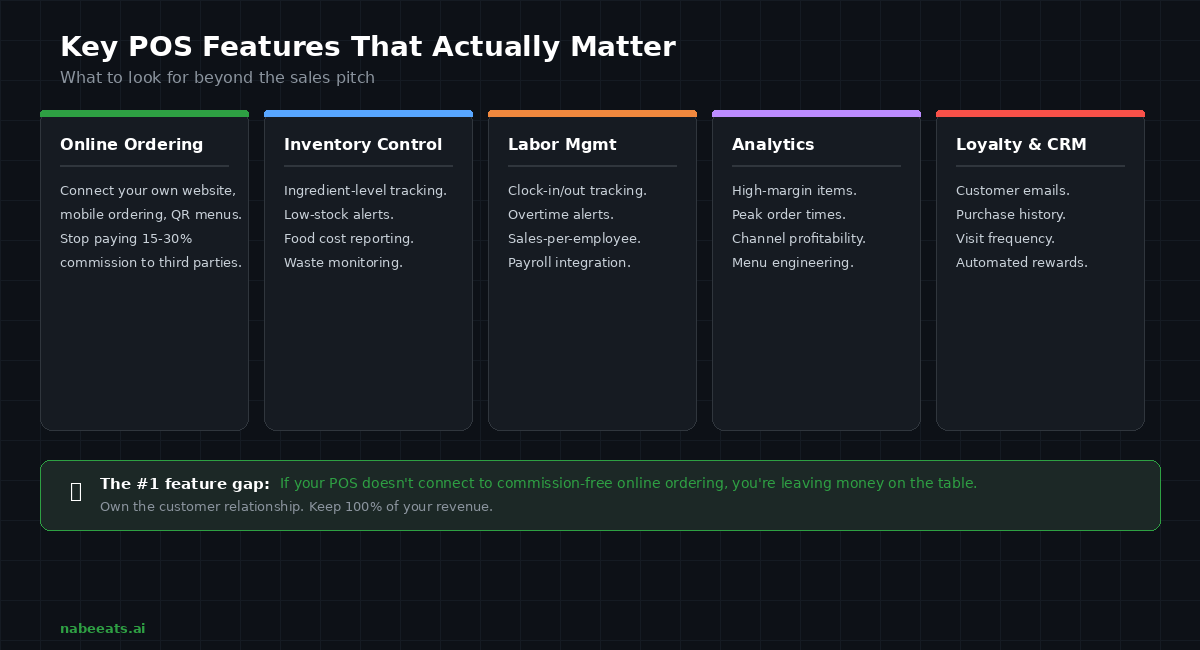
When you are shopping for a POS (and if you are reading this, you probably are), here is what to look for beyond the sales pitch.
Integrated Online Ordering
This is the big one. Your POS should connect directly to your own online ordering system: your website, your mobile ordering, your QR code menus. If it does not, you are maintaining duplicate menus, risking pricing errors, and creating headaches for your staff.
And here is the part a lot of restaurant owners miss: if your POS only connects to third-party delivery apps, you are handing over customer data and paying 15 to 30 percent commission on every order. When your POS integrates with your own commission-free ordering platform, you keep more revenue and you own the customer relationship.
That is not a minor detail. That is the difference between building a business and renting one.
Inventory and Food Cost Control
Look for ingredient-level tracking, low-stock alerts, food cost reporting, and waste monitoring. Your POS should tell you not just what you sold, but what it cost you to make it, in real time.
Labor Management
Clock-in and clock-out, overtime alerts, sales-per-employee tracking, payroll integration. When labor is 30 to 35 percent of your revenue, you need visibility into it, not a surprise at the end of the pay period.
Analytics and Menu Engineering
The best systems show you which items are high-margin, which ones are underperforming, when your peak times are, and how profitable each sales channel is. That is how you build a smarter menu, not based on gut feeling, but on what the data actually says.
Customer Data and Loyalty
A modern POS captures emails, purchase history, visit frequency, and average spend. Pair that with a built-in loyalty program and you have got a system that drives repeat business without you manually running promotions every week.
POS System vs. Cash Register: Why the Comparison Does Not Work Anymore
Some people still ask: do I really need a POS, or can I get by with a cash register?
Here is the honest answer: a cash register records transactions. A POS system runs your business.
A cash register cannot track inventory. Cannot connect to online ordering. Cannot show you which menu items are dragging down your food cost. Cannot send a customer a birthday discount. Cannot tell you whether Tuesday lunch is worth staffing an extra server.
If you are running any kind of restaurant operation that plans to grow, or even just survive the margins, a POS is table stakes.
How to Choose the Right Restaurant POS System
Match It to Your Service Model
A fast-casual counter spot needs a completely different workflow than a fine dining restaurant. Make sure the system was actually built for your model, not adapted from something else.
Check the Integrations
Your POS should play nice with your online ordering platform, your delivery apps, your accounting software, your payroll system, and your marketing tools. If these systems do not talk to each other, you are creating manual work and data gaps.
Look at Total Cost, Not Just the Monthly Fee
Some systems advertise zero dollars per month but charge higher processing rates, expensive hardware, or nickel-and-dime you on add-ons. Compare the full picture: software, hardware, payment processing, and any integrations you will need.
Most cloud-based POS systems run zero to over two hundred dollars per month per terminal, with processing fees of 2.6 to 3.5 percent and hardware costs between five hundred and two thousand dollars or more.
Think Three to Five Years Ahead
Can the system support a second location? Franchise growth? Catering? A loyalty program? You do not want to rip out your POS in two years because you outgrew it.
The Revenue Opportunity Most Restaurants Are Missing

Here is where we get to the part that actually moves the needle on your bottom line.
If your POS is not connected to your own direct online ordering system, you are leaving money on the table in four ways:
1. You are losing customer data to third-party apps that own the relationship.
2. You are duplicating menu management across multiple platforms.
3. You are paying commission fees, sometimes 15 to 30 percent per order, that crush your margins.
4. You are fragmenting your reporting so you cannot see the full picture.
When your POS integrates with commission-free online ordering, everything changes. You keep more revenue per order. You own the customer data. You build repeat business through your own channels. And you simplify operations instead of adding complexity.
The most successful restaurants in 2026 are not just installing a POS and calling it a day. They are connecting it to direct ordering, loyalty programs, and customer data platforms to maximize every dollar of revenue.
Frequently Asked Questions
What is a POS system in a restaurant?
A POS system in a restaurant is the combined hardware and software used to process orders, accept payments, manage inventory, track sales, schedule staff, and generate performance reports, all from one platform.
What is a point of sale system for restaurants?
It is the central operating system that manages every transaction, communicates orders to the kitchen, controls inventory, tracks employee performance, and captures customer data for marketing and loyalty programs.
Is a POS system necessary for small restaurants?
Yes. Even a small restaurant benefits from better reporting, real-time food cost tracking, and integrated online ordering. The efficiency gains alone typically pay for the system within the first few months.
How much does a restaurant POS system cost?
Most cloud-based systems charge zero to over two hundred dollars per month per terminal, with payment processing fees of 2.6 to 3.5 percent. Hardware costs range from five hundred to over two thousand dollars depending on your setup. Some systems charge extra for features like online ordering or loyalty programs, so always compare total cost.
How is a restaurant POS system different from a cash register?
A cash register records transactions. A POS system manages your entire operation: orders, inventory, labor, customer data, online ordering, and analytics. The gap between the two is enormous, and most restaurants cannot operate competitively without a modern POS in 2026.
.png)

.png)


