.png)


Seven-day onboarding promises rarely survive real restaurant operations. Most managers who try to sign up restaurant uber eats accounts discover the delays don’t come from the application itself—they come from document mismatches, payout verification holds, broken menu imports, and launch-day readiness gaps (spoiler: the bank account review usually causes the longest stall).
In our work with restaurant operators at Nabeeats, we’ve seen stores lose 7-14 days simply because the LLC name on a bank statement didn’t exactly match tax filings. According to Uber’s 2026 merchant setup guidance, onboarding requires menu files, banking details, tax information, and identity verification before approval can move forward. Competitor guides oversimplify this process and rarely explain why applications freeze after submission.
You’ll learn how to:
The restaurants that launch fastest usually launch smaller and cleaner—not bigger. Start with the exact documents and setup requirements that trigger most onboarding delays.
How to Sign Up Restaurant Uber Eats Accounts Without Verification Delays
To sign up restaurant Uber Eats accounts without delays, restaurants should prepare matching legal business documents, banking proof, tax forms, and menu files before starting the application because payout verification and activation are reviewed separately.
Gather Your Full Onboarding Packet First
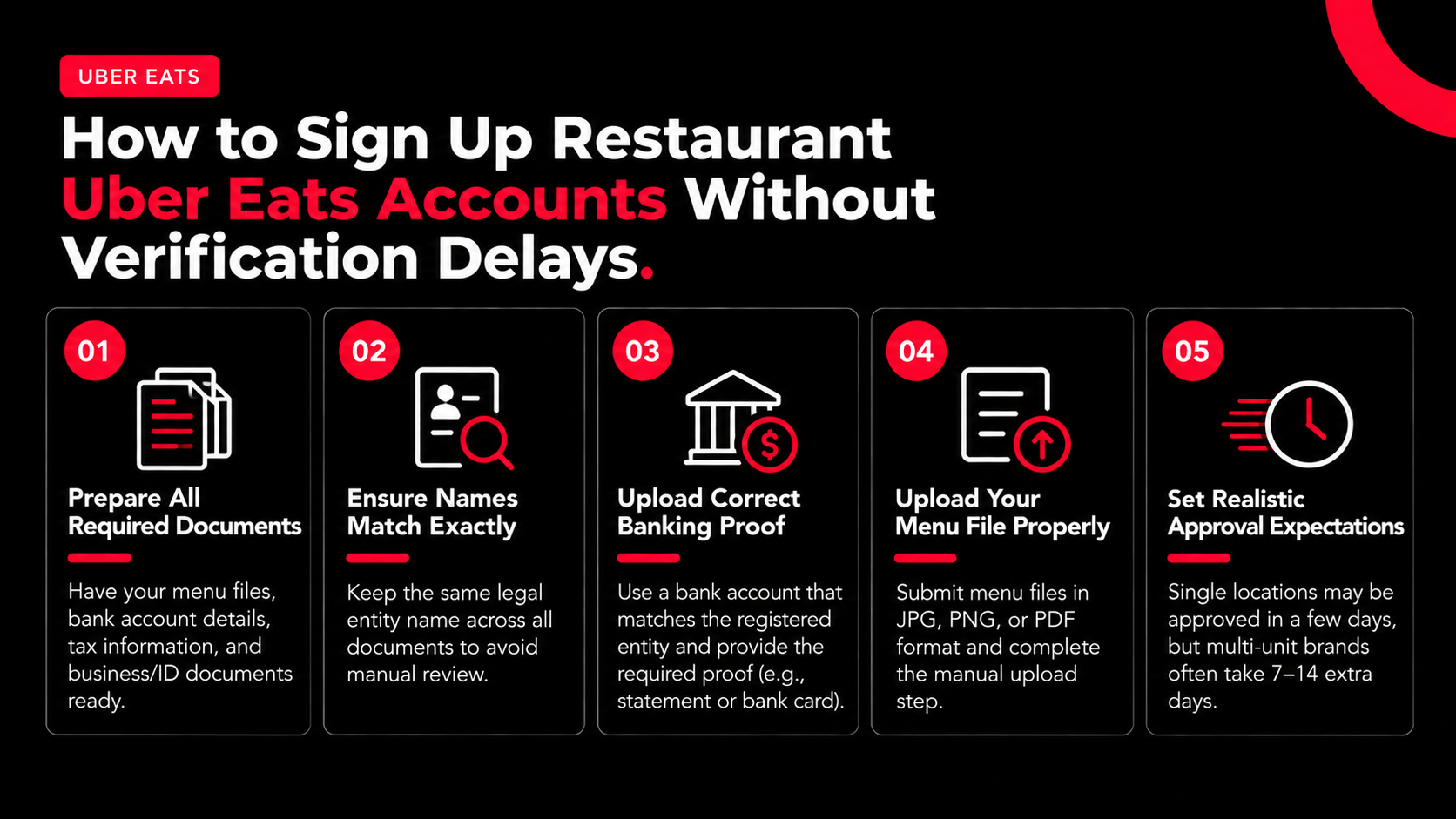
Uber’s merchant setup checklist requires four core items before onboarding can move forward: menu files, bank account details, tax information, and business or ID documents. According to Uber Help for Merchants (2026), missing one document can pause your application before review begins.
Before you create an uber eats restaurant account, build a single onboarding folder with identical naming across every document. Strong applications usually include:
Uber accepts JPG, PNG, or PDF menu uploads and requires merchants to submit the file manually after upload. According to Uber’s Marketplace onboarding documentation (2026), incomplete uploads remain in draft status and won’t enter review.
Match Legal Entity Names Exactly
Legal entity mismatches are a major reason operators get stuck during the uber eats join restaurant process. If your bank account says “ABC Hospitality LLC” but your tax form says “ABC Hospitality, L.L.C.”, Uber’s verification system may flag the account for manual review. Small formatting differences create delays.
Restaurant groups using holding companies, franchise entities, or management agreements run into this often. One four-location Mediterranean fast-casual group in Texas stalled for 11 days because the DBA on its liquor license abbreviated the LLC suffix differently from the bank account. Menu approval finished quickly, but payout verification stayed frozen.
Uber’s risk team treats payout verification separately from store activation. You can have an approved menu while payouts remain locked.
Upload Banking Proof That Matches the Registered Entity
Bank verification is stricter than many managers expect. Uber’s setup process asks for the business name on the account, routing number, and account number during onboarding. According to Uber’s restaurant verification guidelines (2026), merchants may also need a recent bank statement or a photo of the bank card tied directly to the registered company or individual.
The safest approach is simple: use one legal naming convention everywhere. A clean verification package reduces resubmissions, support tickets, and payout holds. If Uber rejects a document, its verification guidance recommends re-uploading corrected files after reviewing the formatting requirements again.
This approach works best for independently owned restaurants with straightforward ownership structures. Operators using layered franchise agreements or multiple ownership entities should expect additional review cycles.
Set Realistic Approval Expectations for Multi-Unit Brands
Single-location restaurants sometimes receive approval within several business days, but multi-unit groups rarely move that quickly. Based on what we’ve seen at Nabeeats, franchise operators and holding-company structures often add 7–14 extra days to payout verification workflows. Tax reviews, signer validation, and ownership checks create bottlenecks before launch.
Many operators waste time chasing menu edits during this period. Uber notes that brand-new merchants often receive an initial menu created by Uber before Menu Maker editing becomes available, so rushing edits early can create unnecessary rework.
Want a cleaner onboarding process? Our restaurant registration walkthrough breaks down the operational steps managers miss most often.
Once your documents and verification flow are stable, the next operational bottleneck is usually menu structure, modifier logic, and upload formatting.
Sign Up Restaurant Uber Eats Menus the Right Way Before Going Live
Uber Eats menu onboarding works best when restaurants launch with a simplified menu because large imports create more modifier errors, integration conflicts, and support issues. The fastest way to sign up uber eats restaurant locations successfully is usually starting smaller, not bigger. At Nabeeats, stores that launch cleanly almost always prioritize menu accuracy over catalog size.
Want help implementing this? See how Nabeeats can help.
Once menu uploads stabilize, the next onboarding bottleneck usually shifts to POS integration reliability, sync ownership, and inventory consistency between systems.
Uber Eats Restaurant Account Integration Problems and Menu Sync Fixes
Uber Eats restaurant account integration problems usually stem from POS configuration errors, menu visibility settings, or overwritten menu data rather than Uber platform outages.
According to Uber’s POS troubleshooting guidance, merchants with integration-based menu issues should contact their POS provider before escalating to Uber support. Most sync failures originate in the middleware layer, not the marketplace itself. That surprises operators rushing to sign up Uber Eats restaurant locations across multiple vendors.
At Nabeeats, we’ve seen support tickets bounce between Uber, Toast, and integration partners because nobody owned the root-cause investigation. One operator waited four days before discovering their POS provider had disabled API permissions during a routine update.
Common Uber Eats Integration Problems and Who Owns the Fix
ProblemLikely CauseFirst ContactOperational RiskMenu items missingOrdering partner visibility disabledPOS providerLost sales from hidden SKUsEntire menu not syncingFailed API connectionIntegration vendorStore cannot launchDuplicate categoriesBad POS mapping rulesPOS providerCustomer confusionLive menu overwrittenFull API PUT pushInternal tech teamActive menu corruptionAuthentication failuresExpired access tokenDeveloper/integration teamOrders stop syncingTest menu appears liveShared credentialsTechnical teamIncorrect production data
Check Menu Visibility Settings Before Rebuilding Menus
Menu visibility settings are a common onboarding blocker. According to Toast’s Uber Eats integration documentation, restaurants must confirm that “Visible to: Online Orders: Ordering partners” is enabled inside Menu Manager. A hidden visibility flag can make synced products disappear from the Uber Eats storefront.
Operators often waste time rebuilding menus instead of checking permissions first.
Use this audit sequence before escalating tickets:
This applies to single-location stores too.
Why API Menu Pushes Create Risk for Multi-Location Brands
API menu overwrites are a major hidden risk inside a connected uber eats restaurant account. According to Uber’s Menu Integration Guide, a PUT /menus request overwrites existing menus entirely. One incorrect API push can replace a working menu across every connected location.
We’ve seen operators delay integration because manual tablets seemed manageable. After direct POS integration launched for one regional pizza chain, canceled orders dropped 31% within six weeks because staff stopped re-entering orders during peak periods.
The benefit is operational consistency, but integrations require stronger change management. Multi-location brands should review menu versions before any production push goes live.
Separate Test and Production Credentials From Day One
Authentication management is another common failure point. According to Uber’s developer documentation, access tokens expire every 30 days and separate test and production credentials are recommended. Expired tokens can interrupt order flow even after launch.
Keep sandbox credentials isolated from live stores. Credential crossover can publish test menus to production marketplaces or disrupt payouts tied to active locations.
Direct integration is not mandatory for every restaurant. A low-volume café may operate adequately with tablets at first, but integrated ordering becomes critical as delivery volume increases and teams need reliable prep timing, inventory accuracy, and staffing coordination.
Once integrations are configured, the next challenge becomes operational launch readiness before the first live orders arrive.
Uber Eats Join Restaurant Launch Checklist for Operational Readiness
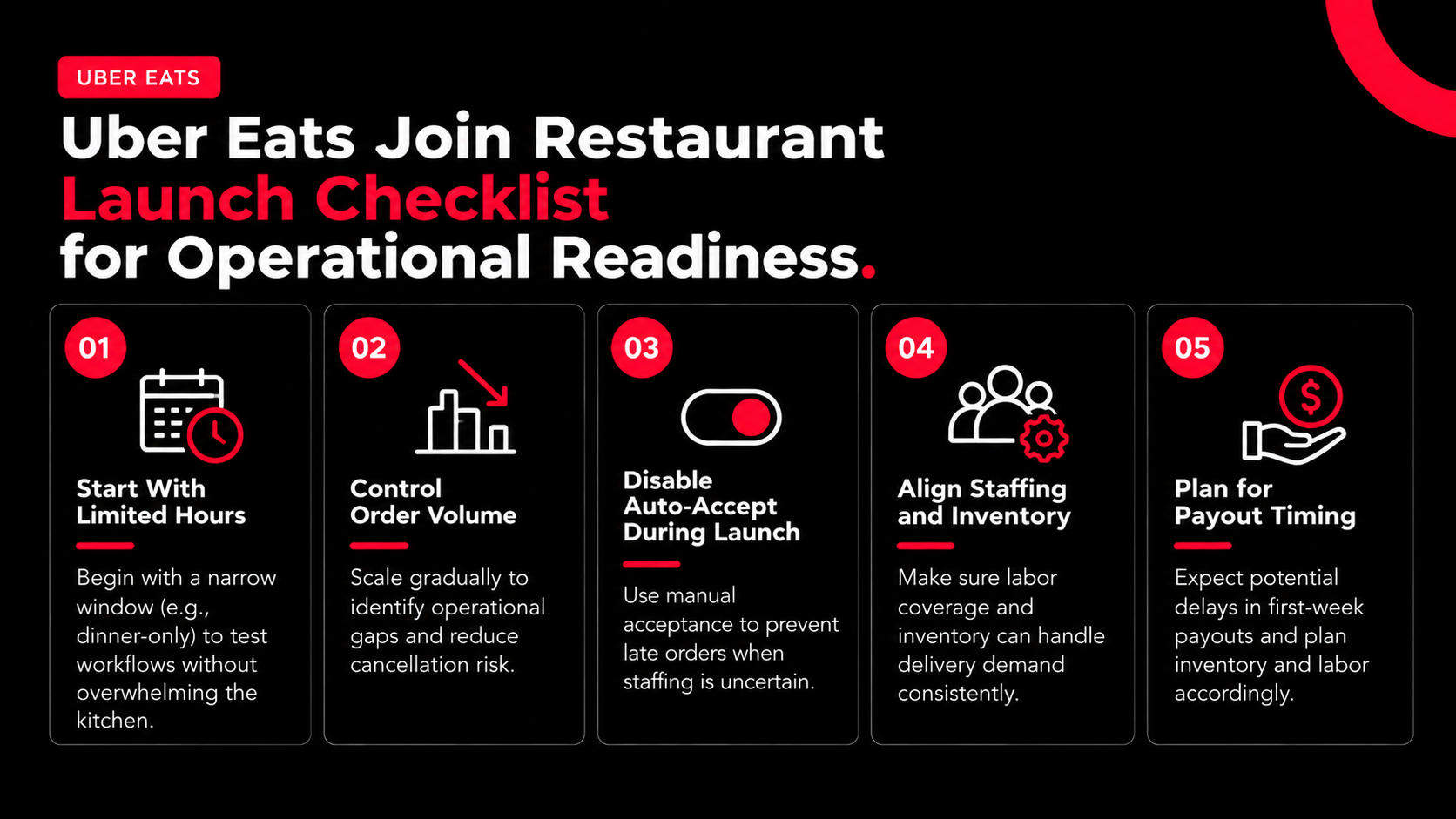
The best Uber Eats launches start with limited hours, controlled order volume, and manual acceptance settings because early reliability metrics affect long-term marketplace visibility. Completing the steps to sign up restaurant Uber Eats accounts only means your store can receive orders—it does not mean your kitchen, staffing, or fulfillment flow can handle delivery demand consistently.
A Midwest burger concept activated auto-accept and opened full delivery coverage on day one. Within two weeks, order defects exceeded 8% because one line cook handled late-night volume, triggering delays, cancellations, and ranking suppression. Operational readiness affects visibility as much as onboarding approval.
Run a Controlled Soft Launch First
A soft launch protects fulfillment reliability during the first week. Restaurants that scale gradually usually outperform operators that open full delivery hours immediately.
Start with a narrow operating window. Dinner-only launches from 5 p.m. to 9 p.m. expose workflow gaps without overwhelming the kitchen. Controlled launches reduce cancellation risk before Uber Eats metrics stabilize.
Use this first-week framework:
Uber merchant guidance emphasizes fulfillment consistency because it directly affects customer satisfaction and repeat orders. Fast onboarding means little if ticket times spike during the first Friday rush.
Disable Auto-Accept if Staffing Is Uncertain
Turning off auto-accept during launch week often protects marketplace performance better than leaving it enabled, even though many uber eats join restaurant guides recommend maximizing throughput immediately.
Auto-accept only works when labor coverage is predictable and kitchen pacing is tested. Manual acceptance gives managers a buffer against late orders during understaffed shifts or unexpected rushes.
Some restaurants improve prep times quickly by pausing automatic acceptance for the first 72 hours and staging incoming orders against dine-in traffic instead of allowing unlimited acceptance during peak periods.
This approach works best for independent restaurants or smaller multi-unit groups with fluctuating labor coverage. Standardized QSR operations with proven delivery staffing can enable auto-accept once workflows stabilize.
Align Staffing and Inventory With Payout Timing
Payout timing is an operational issue, not just an accounting detail. Restaurants entering the sign up restaurant uber eats process often expect immediate payouts to support labor expansion or inventory purchases, but bank verification and transfer timing can still create short-term cash flow gaps.
Inventory planning should assume delayed first-week cash flow until payout timing becomes predictable.
For a broader guide to running a restaurant on Uber Eats, the next section answers operational and onboarding questions managers still ask after activation.
Frequently Asked Questions
How long does it take to sign up restaurant Uber Eats accounts and get approved?
Most restaurants complete the sign up restaurant Uber Eats approval process in 3 to 7 business days when documents, banking details, and tax information match exactly. Multi-location brands or franchise operators may take 2 to 3 weeks because Uber reviews risk and payouts separately from menu activation. Restaurants that submit complete onboarding files upfront usually get approved faster than teams updating documents in stages.
What documents do you need to create an Uber Eats restaurant account?
An Uber Eats restaurant account usually requires a government-issued business ID, tax documentation, bank verification, business license, and a valid menu with pricing. Restaurants using LLC structures should make sure the legal entity name matches banking records exactly because small mismatches can trigger manual reviews. Payout verification failures remain a common activation delay.
Can you edit your menu immediately after you sign up Uber Eats restaurant accounts?
Yes, restaurants can usually edit menus immediately after they sign up Uber Eats restaurant profiles, though some changes may remain under review before publishing. Large menu uploads through POS systems like Toast, Square, or Clover can delay sync timing for several hours. Operators that rebuild menus manually before checking integration permissions often create duplicate catalog issues later.
What should you do if Uber Eats payout verification gets rejected?
Restaurants should review whether the bank account owner, tax entity, and uploaded statements match the Uber Eats restaurant account exactly. One operator resolved a five-day delay by replacing a shortened DBA bank statement with a full legal entity statement. Repeated uploads can sometimes restart manual verification queues, so accuracy matters before resubmitting documents.
Do you need POS integration before you Uber Eats join restaurant onboarding?
No, POS integration is not required before you Uber Eats join restaurant onboarding, and many independent restaurants launch successfully using tablet-based order management first. Nabeeats recommends delaying complex integrations until stores validate fulfillment timing and menu performance because early API sync issues create unnecessary operational problems. Larger chains with centralized menus may still benefit from pre-launch integrations.
Should restaurants launch with their full menu on Uber Eats immediately?
No, most restaurants perform better by launching with a focused delivery menu instead of their entire in-store catalog. Operators that simplify early digital menus often reduce fulfillment errors and improve first-week ratings because kitchens adapt faster to delivery demand. A smaller launch menu also creates cleaner sales data before expanding categories inside the Uber Eats restaurant account.
What’s the best way to avoid delays when you sign up restaurant Uber Eats onboarding?
The best way to avoid delays when you sign up restaurant Uber Eats onboarding is to treat activation like an operations project instead of a simple form submission. Stores using approval checklists, staged menu testing, and controlled soft launches typically go live faster and experience fewer first-week order issues. Tools like Nabeeats can also help streamline operations alongside marketplace onboarding.
Take Action on Your sign up restaurant uber eats Launch
Most restaurants don’t get delayed when they sign up restaurant uber eats because of the application itself. Delays usually come from document mismatches, messy menu builds, broken integrations, and weak launch operations.
Uber’s merchant setup guidance requires menu files, banking details, tax information, and verification documents before activation. Nabeeats recommends standardizing those assets before touching menu uploads or integrations to create a stable launch.
Start with a document audit and soft-launch checklist, then use Nabeeats to simplify ordering, retention marketing, and operational visibility after launch.
.png)



.png)


